Exam Tips
New on Deutschmeister: A Better Way to Track Your Exam Progress
A new way to track your progress on Deutschmeister. Review completed tests, compare scores across each Teil, follow your improvement over time, and easily revisit or retake previous exams.
Administrator Deutschmeister
3 min read
10,024 views
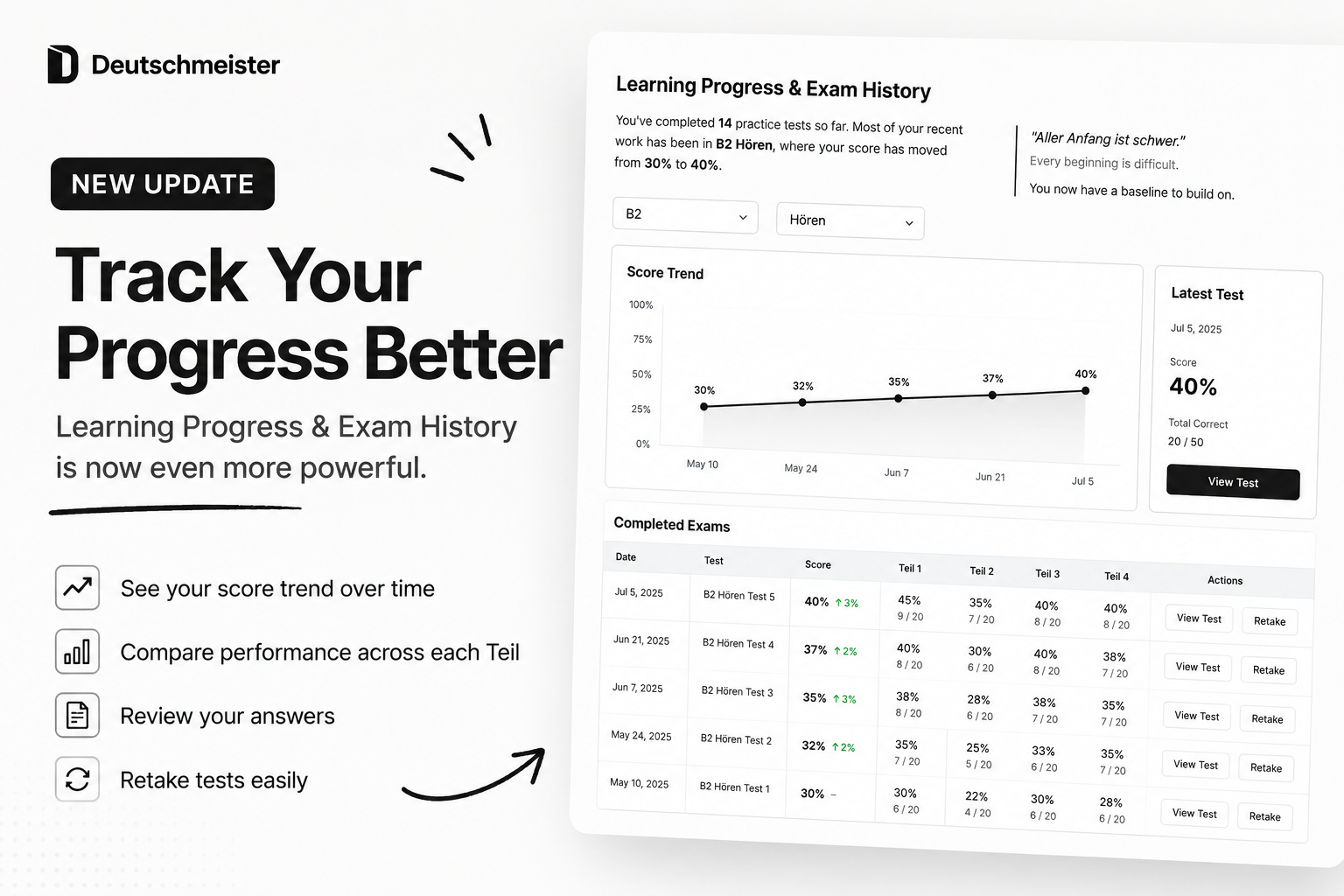
We’ve released a new Learning Progress and Exam History experience on Deutschmeister.
Until now, checking a completed practice test mainly meant looking at the result of one attempt. With the new page, you can now look at your performance over time and understand how your results are changing from one test to the next.
See your learning journey at a glance
When you open the page, Deutschmeister gives you a short overview of your practice history.
You can see how many tests you’ve completed, what level and module you’ve been practicing recently, and how your performance has changed across your latest attempts.
Depending on your recent progress, you may also see a short German saying together with its English meaning.
Choose a level and module
You can filter your results by CEFR level and exam module.
For example, you can choose between B1, B2, or C1, and then select Lesen, Schreiben, or Hören.
After selecting a level and module, the page automatically updates to show only the relevant practice history.
Follow your score trend
A new progress graph shows how your scores have developed across previous attempts.
This makes it easier to see whether your performance is improving, staying consistent, or changing from one test to the next.
You can also click a point on the graph to quickly find the corresponding completed test.
Compare each Teil across attempts
The completed exam table now gives you a more detailed comparison of each test.
Instead of only showing the overall score, you can also compare your performance in each Teil.
- See your accuracy for each Teil
- Check correct and incorrect answers
- Compare results with your previous attempt
- Identify which sections are improving
For example, your overall Hören score may improve, but the comparison might show that most of the improvement came from Teil 1 while Teil 2 still needs more practice.
Review or retake previous tests
Each completed test now has two direct actions.
View Test opens the previous attempt so you can review your answers.
Retake Test allows you to start the same test again. Your previous result remains in your history, so you can compare the new attempt with the old one afterwards.
Why we built this
Exam preparation is not only about completing more tests. It is also important to understand whether your practice is actually helping.
With this update, we want Deutschmeister to make it easier to see the connection between your previous attempts, your current performance, and the areas that still need attention.
Instead of asking only, “What score did I get?”, you can now also ask, “How am I improving?”
We hope this makes your practice sessions more useful and gives you a clearer picture of your progress.
You can try the new Learning Progress and Exam History page now from your Deutschmeister account.